


Introduction
If you’ve spent years sitting at a traditional desk, you’ve probably heard that sitting all day isn’t great for your health. But not everyone wants to buy a full standing desk, deal with the cost, or rearrange their entire workspace. That’s where a riser desk comes in — a simple, affordable way to add standing time to your workday without replacing your existing desk.
In this guide, we’ll break down exactly what a riser desk is, how it works, and how it compares to a full standing desk — so you can decide which option actually fits your needs, without any brand pushing one product over another.
What Is a Riser Desk?
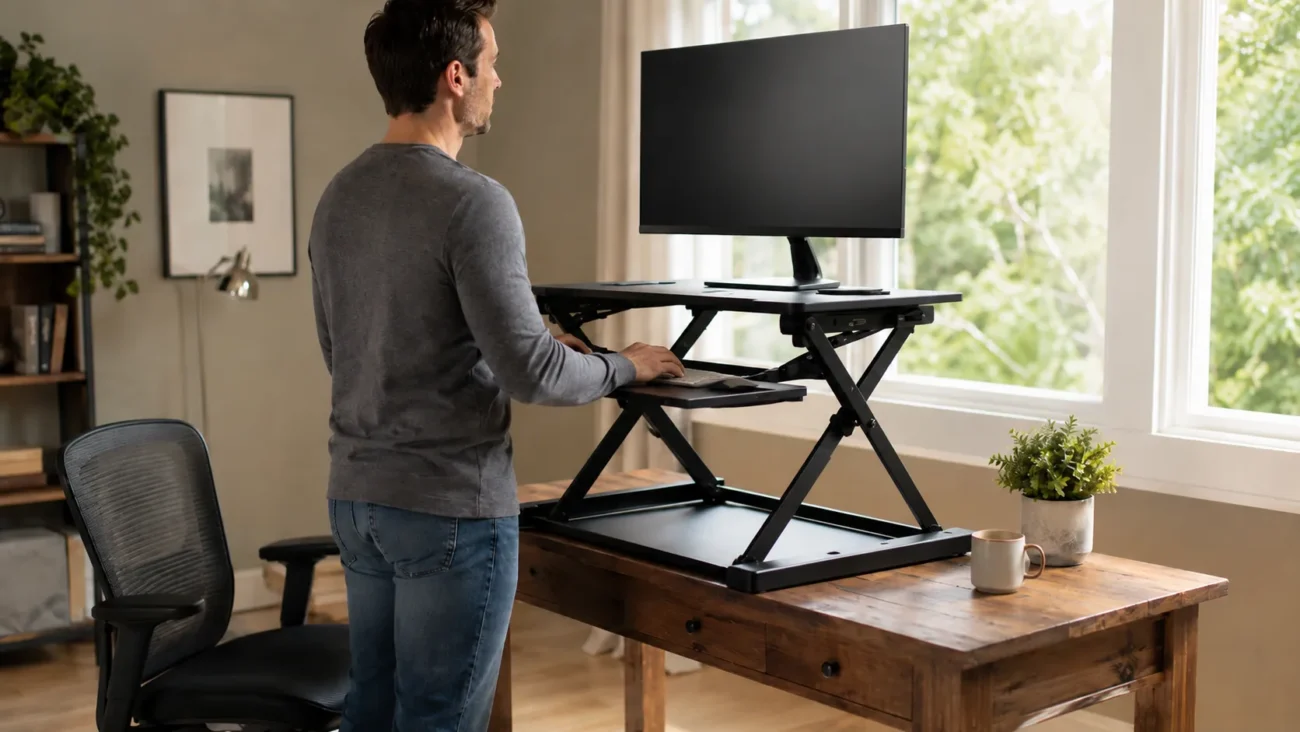
A riser desk — also called a desk riser, standing desk converter, or desktop converter — is a device that sits on top of your existing desk and allows you to raise your monitor, keyboard, and mouse to a standing height. Instead of replacing your desk entirely, a riser desk transforms it into a height-adjustable workstation.
Most riser desks feature two tiers: a lower platform for your keyboard and mouse, and an upper platform for your monitor or laptop. You can raise the entire unit when you want to stand and lower it back down when you want to sit, typically in just a few seconds.
Because they sit directly on top of your current desk rather than replacing it, riser desks are generally more affordable and easier to set up than full standing desks — making them a popular entry point for people who want to reduce sitting time without a major investment.
How Does a Riser Desk Work?
Riser desks use one of a few different mechanisms to raise and lower the platform, each with its own trade-offs in terms of speed, effort, and cost.
Pneumatic (Gas Spring) Mechanism
This is the most common type found in mid-range riser desks. A gas spring mechanism allows you to lift the desk with minimal effort — usually just squeezing a handle or lever — and it locks into place at your chosen height. Adjustments typically take just a few seconds.
Manual Crank Mechanism
Some riser desks use a hand crank that you turn to raise or lower the platform. This method is generally more affordable but slower, often taking 20–30 seconds to fully adjust the height.
Electric Motor Mechanism
Higher-end riser desks include an electric motor, allowing you to raise or lower the desk at the push of a button. This is the fastest and most effortless option, though it usually comes at a higher price point.
Manual Lift (No Spring Assistance)
The most basic and least expensive riser desks require you to lift the platform by hand with no spring or motor assistance, similar to adjusting a simple shelf. These require more physical effort, especially if the desk holds a heavy monitor setup.
Regardless of mechanism, most riser desks lock securely into place at your chosen height, keeping your monitor and keyboard stable while you work.
Types of Riser Desks
Beyond the lifting mechanism, riser desks also come in different structural formats designed for different work setups and space requirements.
Single-Tier Riser Desks
These have one flat platform that raises your monitor, keyboard, and mouse together at the same height. They’re typically more compact and often more affordable, but they don’t allow your keyboard to sit at a slightly lower angle than your monitor, which some users find less ergonomic during typing.
Dual-Tier Riser Desks
These feature two separate platforms — a lower one for your keyboard and mouse, and a raised upper shelf for your monitor. This design more closely mimics proper ergonomic positioning, since your eyes should generally align with the top of your monitor while your arms rest at a comfortable typing height. Dual-tier models are the most popular choice for daily, full-time use.
Compact Riser Desks
Designed for smaller desks or minimal setups, compact riser desks usually support a single monitor and a narrow keyboard tray. They take up less desk space but may not comfortably fit dual-monitor setups.
Full-Width Riser Desks
These larger models are built to support wider desk setups, including dual monitors, larger keyboards, or additional accessories like a mouse pad extension or a document holder. They require significantly more desk depth and surface area.
Riser Desk vs. Full Standing Desk — Key Differences
Both riser desks and full standing desks let you alternate between sitting and standing, but they differ significantly in cost, setup, and overall experience. Here’s a side-by-side comparison to help clarify the differences:
| Feature | Riser Desk | Full Standing Desk |
| Cost | Generally $100–$400 | Generally $300–$1,000+ |
| Setup | Sits on top of existing desk, minimal assembly | Often replaces your current desk entirely |
| Work Surface | Limited to the size of the riser platform | Full desk surface, customizable |
| Portability | Can be moved between desks or locations | Typically fixed in place |
| Stability | Generally stable, though quality varies by mechanism | Very stable, since the entire desk moves as one unit |
| Adjustment Range | Limited height range, based on desk height | Full range, floor to standing height |
| Best For | Renters, budget-conscious buyers, shared workspaces | Long-term home offices, dedicated workstations |
The core trade-off is simple: a riser desk offers a lower-cost, more flexible way to start standing while working, but it comes with some compromises in surface space and adjustment range. A full standing desk offers a more complete, seamless setup, but requires a larger investment and often means replacing your existing desk.
Benefits of Using a Riser Desk
The primary appeal of a riser desk is the ability to alternate between sitting and standing throughout the day, which research has linked to several health and productivity benefits.
Reduced Sedentary Time
Multiple health organizations, including the American Heart Association, have highlighted the risks associated with prolonged sitting, including links to cardiovascular issues and metabolic problems. A riser desk makes it easy to break up long sitting periods without requiring you to stand for your entire workday.
Improved Posture Awareness
Alternating between sitting and standing encourages you to notice and adjust your posture more frequently than staying in one fixed position all day. Many users report reduced lower back discomfort after incorporating regular standing intervals.
Increased Energy and Focus
Some users report feeling more alert and focused when they incorporate standing periods into their workday, likely due to increased blood circulation and reduced muscle stiffness. However, individual results vary, and a riser desk isn’t a substitute for regular movement and exercise throughout the day.
Low-Cost Entry Point for Ergonomic Improvement
Compared to a full standing desk setup, a riser desk offers a significantly lower-cost way to test whether a sit-stand routine works for you, before committing to a larger investment in office furniture.
Important Note: It’s worth being clear that a riser desk — or any sit-stand setup — isn’t a cure-all. Health experts generally recommend combining periods of standing with regular movement and breaks, rather than simply replacing constant sitting with constant standing.
Who Should Choose a Riser Desk vs. a Full Standing Desk?
Deciding between a riser desk and a full standing desk depends largely on your budget, workspace, and how you plan to use it. Here’s a practical breakdown to help you decide:
A Riser Desk Is a Better Fit If:
- You’re renting or don’t want to replace your existing desk
- You want to test whether standing while working actually suits you, before making a bigger investment
- You work in a shared office space where a permanent standing desk isn’t practical
- You have a limited budget for ergonomic upgrades
- You want the flexibility to move the unit between desks or take it with you if you relocate
A Full Standing Desk Is a Better Fit If:
- You spend most of your workday at the same desk long-term
- You need a larger, fully customizable work surface
- You want a more seamless, permanent solution without a platform sitting on top of your desk
- You’re setting up a dedicated home office and can invest more upfront
- You prefer a wider adjustment range, including sitting heights lower than a standard desk
Neither option is objectively “better” — the right choice depends on your specific situation, budget, and how long-term your workspace setup is.
What to Look for When Buying a Riser Desk
If you’ve decided a riser desk is the right fit, choosing the right one comes down to a few key specifications that many buyers overlook. Here’s what actually matters:
Weight Capacity
Check the platform’s maximum weight capacity, especially if you use a dual-monitor setup or heavier equipment. Most riser desks support 20–35 lbs, but larger dual-monitor setups may require a higher-capacity model. Exceeding the weight limit can affect stability and shorten the product’s lifespan.
Desktop Depth Compatibility
Measure your existing desk’s depth before buying. Some riser desks require a minimum desk depth to sit securely and avoid tipping forward, particularly at full height extension. This is one of the most commonly overlooked factors, leading to stability issues after purchase.
Height Range
Look at both the lowest and highest points the riser desk can reach. If you’re tall, make sure the maximum height is enough for comfortable standing use. If you’re petite, check that the lowest sitting height doesn’t force your wrists into an uncomfortable angle while typing.
Stability at Full Extension
Some riser desks feel sturdy at low heights but wobble when fully extended. Reading verified customer reviews specifically about stability at maximum height can help you avoid this issue, since this detail often isn’t obvious from product photos alone.
Keyboard Tray Depth
A shallow keyboard tray can crowd your keyboard and mouse together, especially if you use a wrist rest. Look for a tray with enough depth to comfortably fit your input devices without feeling cramped.
Ease of Height Adjustment
Consider how often you’ll actually adjust the height throughout the day. If you plan to switch between sitting and standing frequently, a slower manual crank mechanism may become a hassle compared to a pneumatic or electric option.
How to Set Up Your Riser Desk Correctly
Owning a riser desk doesn’t automatically mean you’re using it correctly. Poor setup can lead to the same posture problems you’re trying to avoid. Here’s how to position it properly:
Monitor Height
The top of your monitor screen should be roughly at or slightly below eye level when standing. This prevents you from tilting your neck up or down for extended periods, which can lead to neck strain over time.
Elbow Angle
When typing, your elbows should form roughly a 90-degree angle, with your wrists staying straight rather than bent upward or downward. If your keyboard tray sits too high or too low, it can lead to wrist discomfort over time.
Screen Distance
Keep your monitor about an arm’s length away from your face. Standing desks can sometimes shift your natural distance from the screen, so it’s worth double-checking this after raising the platform.
Sitting-to-Standing Ratio
Most ergonomic guidelines suggest alternating positions every 30–60 minutes rather than standing for extended, continuous periods. Standing for too long without breaks can lead to its own set of issues, including leg fatigue and lower back strain.
Footwear and Flooring
If you plan to stand for extended periods, consider a cushioned anti-fatigue mat and supportive footwear. Standing on hard flooring for long stretches without cushioning can contribute to foot and joint discomfort.
Frequently Asked Questions
What is a desk riser?
A desk riser (or riser desk) is a platform that sits on top of your existing desk, allowing you to raise your monitor and keyboard to standing height without replacing your desk.
Are riser desks worth it?
For most people looking to reduce sitting time without a major investment, yes. They offer a lower-cost, flexible way to test a sit-stand routine before committing to a full standing desk.
How high should a riser desk be?
The ideal height depends on your own height and posture, but generally, your monitor should be at eye level and your elbows at roughly 90 degrees while typing.
Are riser desks good for your back?
They can help by reducing prolonged sitting time and encouraging more frequent posture changes, but proper setup matters. Poor monitor or keyboard positioning can offset the benefits.
Do riser desks fit any desk?
Not always. It’s important to check your desk’s depth and surface size against the riser desk’s footprint and stability requirements before purchasing.
What’s the difference between a riser desk and a standing desk converter?
These terms are generally used interchangeably. Both refer to the same type of product — a platform that converts an existing desk into a height-adjustable workstation.
Conclusion
A riser desk offers a practical, budget-friendly way to reduce sitting time and improve your workspace ergonomics without committing to a full standing desk replacement. While it comes with some trade-offs in surface space and adjustment range compared to a full standing desk, it remains one of the most accessible entry points into a sit-stand routine.
The right choice ultimately depends on your workspace, budget, and how long-term your setup needs to be. Whichever option you choose, remember that the real benefit comes from movement itself — alternating between sitting and standing regularly, rather than relying on either position alone.
